Precise DefectFH/FZ5 Processing Item Function Reference Manual
371
2
Inspecting and Measuring
Creating a static mask from an image of another unit
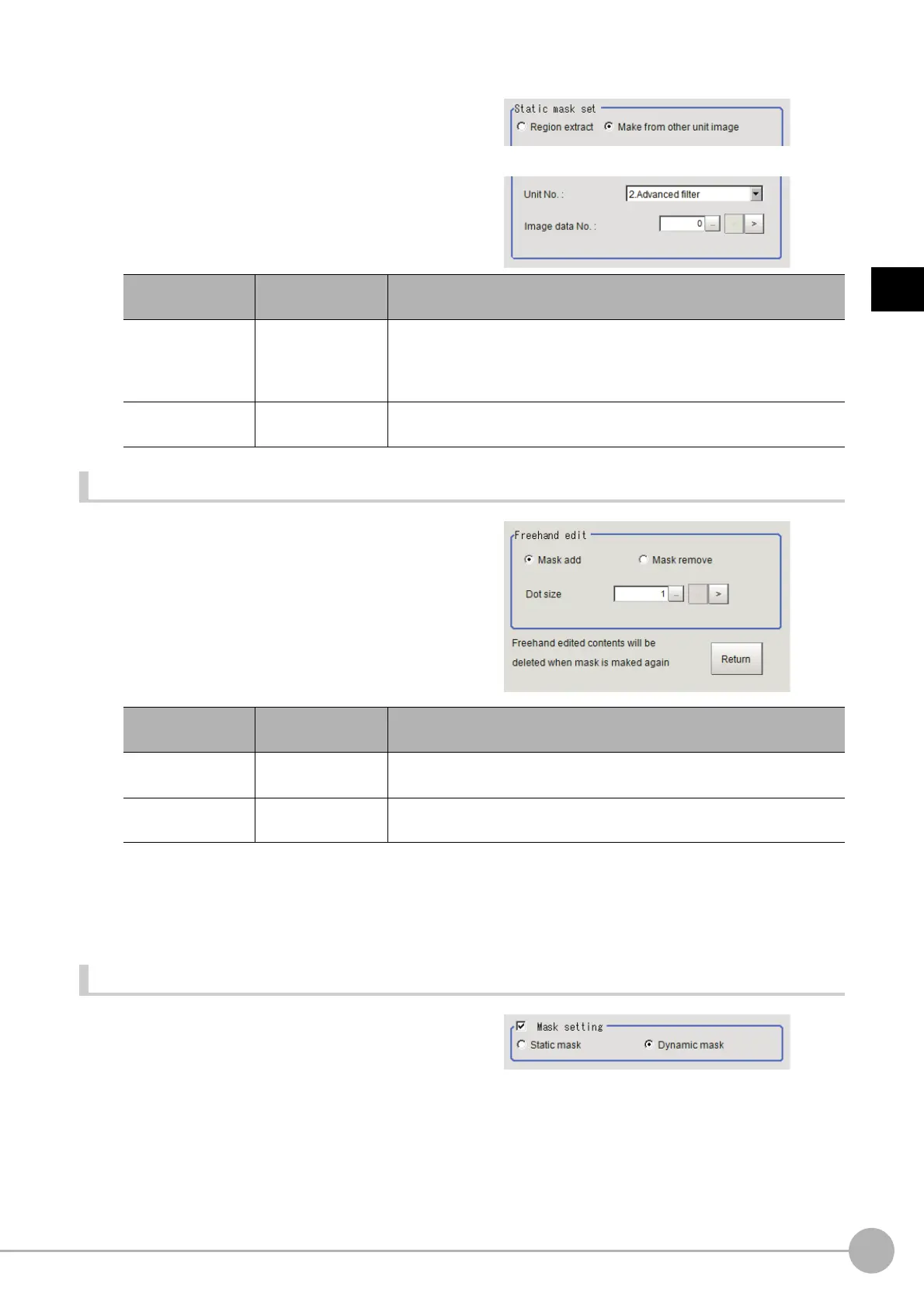
1 In the Static mask set area, select "Make
from other unit image".
2 Set the unit number and image data
number.
Performing fine adjustment on a static mask
1 To perform fine adjustment on a mask
region, click [Freehand edit] in the Static
mask setting area.
2 Click [Return] to exit the free hand edit.
Clearing the static mask setting
To clear the static mask setting, click [Clear].
Creating a dynamic mask
1 In the Mask setting area, select
"Dynamic mask".
Setting item
Setting value
[Factory default]
Description
Unit No. -
Specify the number of the unit whose image will be referenced.
The reference unit should be able to output binarized images.
For example, select a labeling filter processin
g
image for advanced
filtering.
Image data No.
0 to 3
[0]
If the unit supports advanced filtering, numbers 0 to 3 can be set.
Ot
herwise, it is fixed to 0.
Setting item
Setting value
[Factory default]
Description
Freehand edit
• [Mask add]
• Mask remove
Select a process performed using the free hand edit.
Dot size
1 to 20
[1]
Set the size of dots used when drawing images on the screen.



 To Next Page
 Loading...










