1/05
8d-84
DocuColor 12/DCCS50
REP 15.2.8, REP 15.2.9
Reissue
Finisher/Sorter
Replacement
1. Reinstall the Lower Exit Chute Assembly onto the Finisher frame.
2. Use the screws (4) to secure the Lower Exit Chute Assembly to the Finisher frame.
3. Slide the metal bearing onto the rear of the Pa
ddle Drive Shaft, and use an E-ring to
secure the bearing to the rear of the Finisher.
4. Reinstall the Exit Roll.
5. Reinstall the Upper Exit Chute Assembly.
6. Reinstall the Eject Pinch Roll Assembly.
7. Reinstall the Compiler Cover Assembly.
8. Reinstall the Rear Lower Cover.
9. Reinstall the Stapler Cover Assembly.
REP 15.2.9 Stacker Tray Drive Belts
Parts List on PL 18.26
Removal
WARNING
To avoid personal injury or shock, disconnect the Finisher cable connector. Switch off
the machine power and disconnect the machine Power Cord.
1. Switch off the printer power and disconnect the AC Power Cord.
2. Remove the Stacker Tray Assembly (REP 15.2.
2).
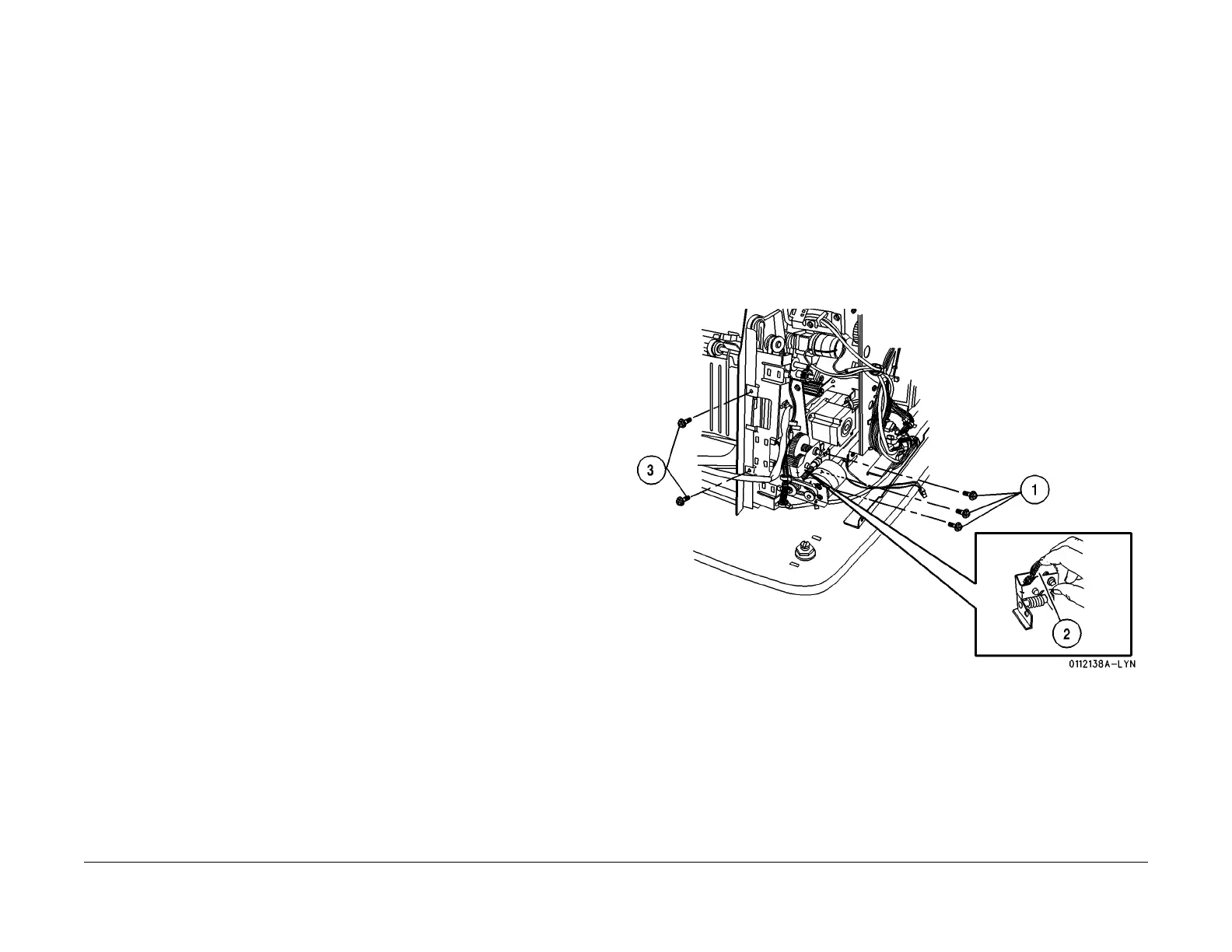
3. Remove the Stacker Motor Bracket and the Sensor Bracket (Figure 1
).
1. Remove the screws (3) securing the Stacker Motor Bracket.
2. Pull the Dog Clutch Gear away from the Dog Clutch Pulley then remove the Bracket.
3. Remove the screws (2) securing the Sensor Bracket to the Tray Frame, and remove
the
Sensor Bracket.
Figure 1 Remove the Stacker Motor Bracket
4. Remove the Front Stacker Tray Drive Belt (Figur
e 2).
1. To remove the front Stacker Tray Drive Belt, raise the Stacker Tray to the top of the
stacker
. Remove the screws (2) from the front Stacker Tray Drive Belt Clamp.
Remove the E-ring from the top front Pulley and remove the Flange.
2. Support the Stacker Tray with one hand and pull the front Stacker Tray Drive Belt and
t
he
Belt Clamp from the Tray bracket. Remove the Belt Clamp from the Front Belt,
and remove the Front Belt from the Stacker Tray Assembly.
manuals4you.commanuals4you.com


 To Next Page
 Loading...










