1/05
4-73
DocuColor 12/DCCS50
REP 5.5.1
Repairs and Adjustments
Reissue
REP 5.5.1 Waste Toner Auger
Parts List on PL 5.5
Removal
WARNING
Turn power off and disconnect the power plug.
NOTE: Protect the floor with a sheet of paper where the removed waste Toner Auger is to be
placed.
1. Remove the IOT Rear Cover (PL
11.3 Item 7).
2. Remove the Fly Wheel (PL 1.
1 Item 10).
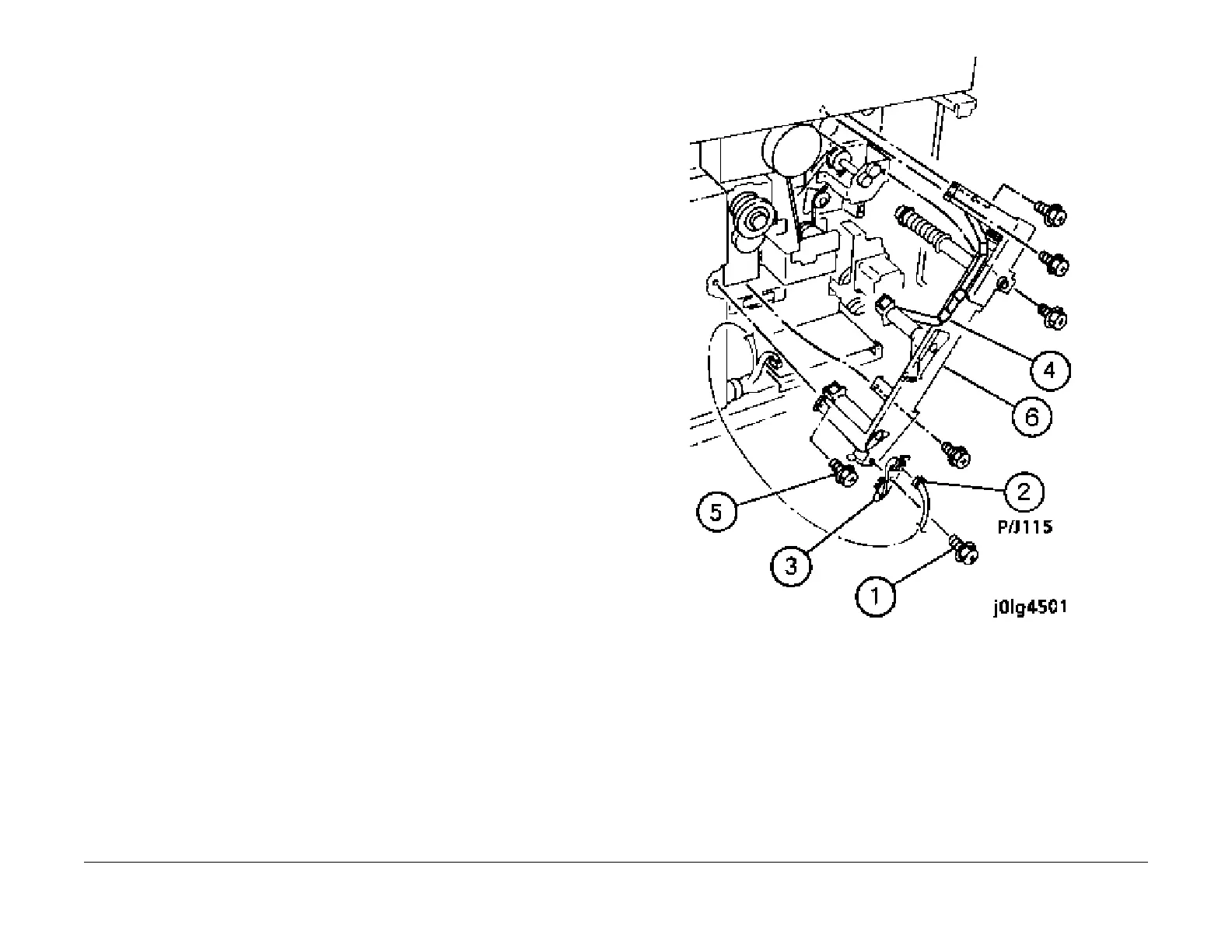
3. Remove the Waste Toner Auger (Figure 1).
1.
Remove the screw.
2. Disconnect the connector.
3. Remove the Auger Sensor.
4. Remove the wire from the wire clips.
5. Remove the screws (5).
6. Remove the Waste Toner Auger.
Figure 1 Remove the Waste Toner Auger
Installation
1. Reinstall the parts in the reverse order of disassembly.
2. Ensure that the Drum CRU,IBT Assembly, and the Waste Toner Bottle are removed before
installing t
he auger.


 To Next Page
 Loading...










