CHYRON Corporation
Advanced Read FX 15-8 Revision D
Transition Pattern H executes row-by-
row. The Speed setting applies to
each non-Fixed row, not to the entire
effect. For example, a four row
message containing one fixed row, at
a Speed setting of 300, takes 900
fields (15 seconds NTSC or PAL-M; 18
seconds PAL) to execute. All other
Transition Patterns, excluding J, take
300 fields (5 seconds NTSC or PAL-M;
6 seconds PAL) to execute.
5HYHUVH
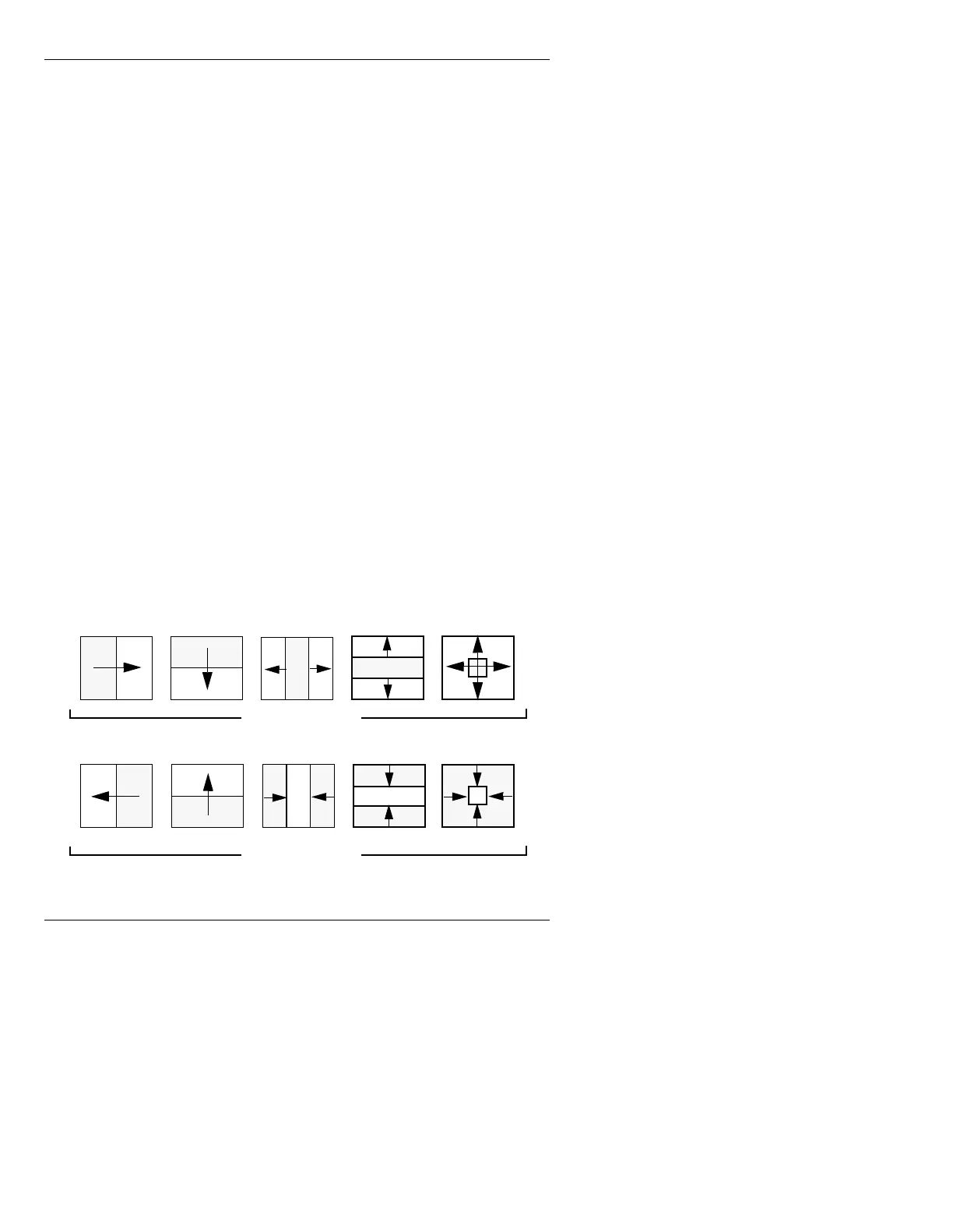
Reverse: Off and Reverse: On control the direction in
which an effect moves. Transition Patterns
A - E and I
can be controlled by
Reverse. Transition Patterns F, G, H
and J are not affected by Reverse. Figure 15-4 illus-
trates how
Reverse works. The shaded area represents
the new image and the direction the effect is moving.
To set
Reverse:
[ ] 1. Place the cursor on the
Reverse: field.
[ ] 2. Press the
SPACE BAR or click on the field to
toggle the
Reverse: field On or Off.
Figure 15-4. Reverse: Off and Reverse: On
Reverse: Off
Reverse: On
ABCDE
ABCDE



 To Next Page