CHYRON Corporation
Font Create Utility 18-10 Revision D
• While in the EDGE TYPE field, type the first letter
of the Edge Type, then press
or cursor to the next
field.
If you choose
NO EDGE, the EDGE DIR and EDGE SIZE
fields become unavailable. If you choose
BORDER, the
EDGE DIR field becomes unavailable.
('*(',5(GJH'LUHFWLRQ
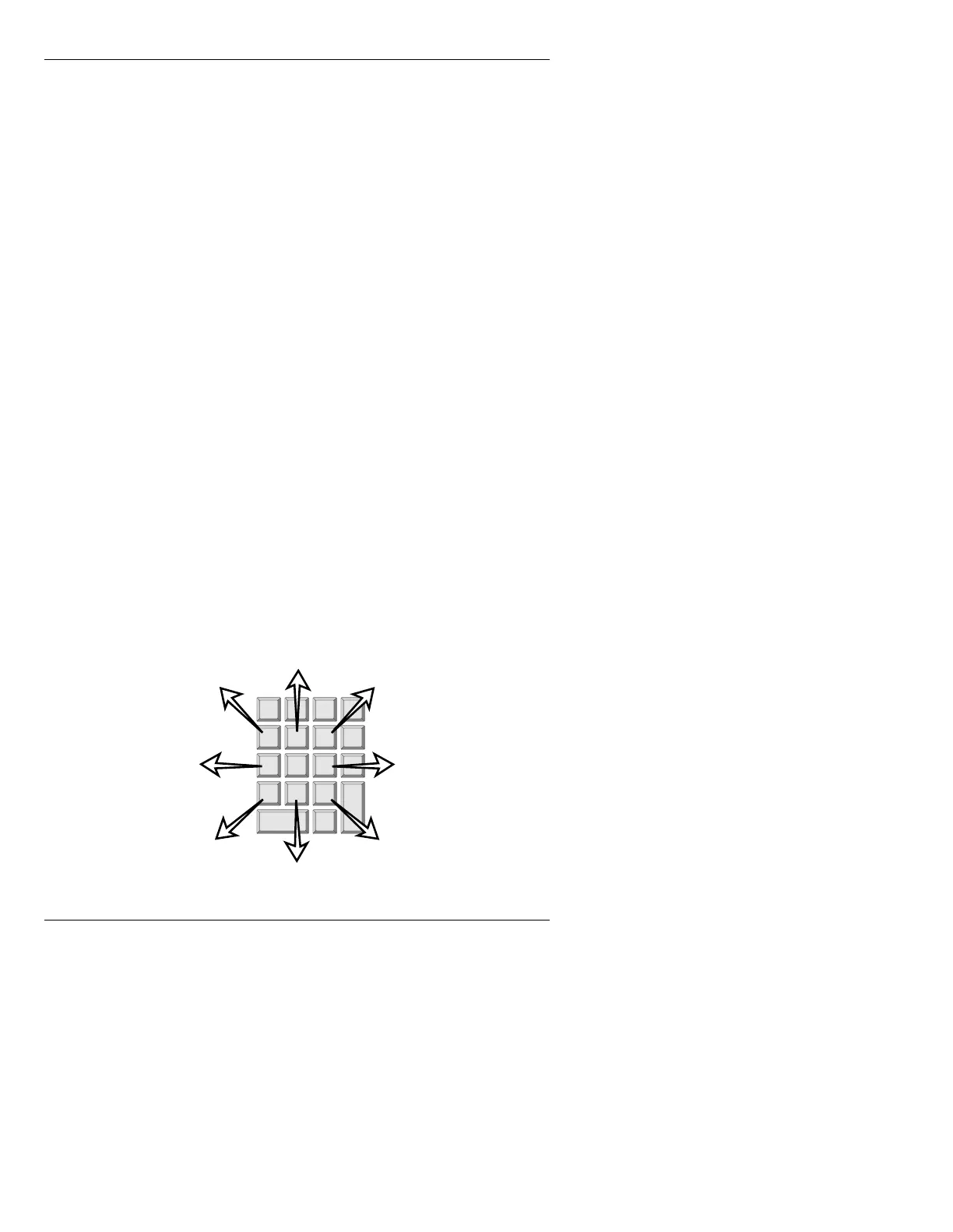
Eight Edge Directions are available to SHADOW, OFF-
SET
, or COMBINED Edge Types: 1 - LOW LT (lower
left), 2 -
DOWN, 3 - LOW RT (lower right), 4 - LEFT, 6 -
RIGHT, 7 - UP LT (upper left), 8 - UP, and 9 - UP RT
(upper right).
To choose an Edge Direction:
• While in the
EDGE DIR field, press the SPACE BAR
to toggle through the above choices, then press
or
cursor to the next field.
OR...
• While in the
EDGE DIR field, type the corresponding
number assigned to the Edge Direction using the
Address Keypad. Note that there is no Edge Direc-
tion assigned to number 5.
Figure 18-6. Edge Direction
1
2
3
4
6
7
8
9



 To Next Page